De-centralized privacy tools and more — free for personal use
A few peculiar facts about how email really works, each with the specification that allows it.

Is the following a valid email addresses? very.”(),:;<>[]”.”Strange@\ "hm”.see@onehint.org
Believe it or not, the above address is valid per the RFC 2822 (Internet Message Format).
In practice, using an email address with such a format requires for the email provider to support SMTPUTF8, something not supported by all servers (due to the "[", "]" characters). In practice, email servers may enforce additional restrictions on the format of the email addresses that they accept.
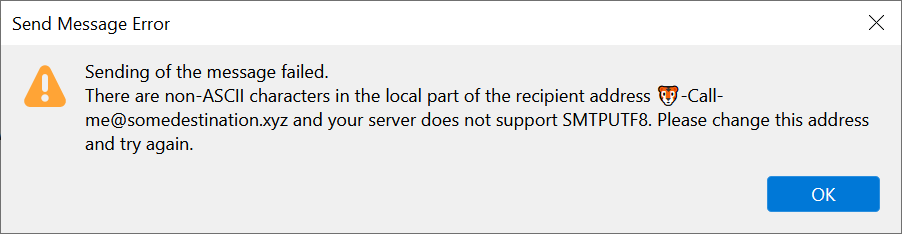
Use of SMTPUTF8 is also needed to support for the following characters in an email:
From: "☕ Ashley Jones"
Subject: Call me! ⌚
This is because the above address and message contain UTF8 characters, something not envisioned at the time of the original Internet specifications for mail servers.
The workaround? Use our RFC 2047 MIME Word Encoder Tool, which will translate the above into From: "=?utf-8?Q?=E2=98=95?= Ashley Jones" Subject: Call me! =?utf-8?Q?=E2=8C=9A?=
The full RFC 2047 specification can be found here.
The «From» field requirement is not enforced by all email providers Surprised? email providers populate the «From» field based on the information you entered when registering your email account. According to the RFC 2822, the Internet Message Format, "The only required header fields [for an email] are the origination date field and the originator address field". However, not all email systems enforce this from the technical standpoint.

Some email providers may refuse to accept a Sender-less message but as a practical matter and one of technical capability, many do not. While a Message-ID is not a required field for an email, some services like Gmail, refuse to accept a message without it. But back to the Sender-less scenario: what will a message without a "From" field look like? The Sender will be shown as empty (blank) or [Unknown].

As a matter of fact, the vast majority of the common email fields are not required for an email so, at times, the only property an email needs to be delivered is the destination address. Test it for yourself — send yourself an email without specifying the «From» address.
When you send a message from your phone, the phone's IP addressed is revealed. When an email is sent using a webmail service through a web browser, the email server typically records the IP address of the email web service in the header, e.g. the IP associated with mail.yahoo.com, while not necessarily recording the IP address of the user sending the message.
The situation changes when a message is sent from an email app on your phone or tablet. In this scenario, the email app, not the webmail service, originates a connection to the email server, causing the phone's IP address to be typically recorded in the message header.
While the phone's IP is dynamically assigned by the cellular service provider and can frequently change, at the very least, the country of the sender may be revealed (except when using a VPN). Further, if the phone is on a WiFi connection at home or at a local restaurant, the IP address can signify an actual phone's location with much more certainty, through a geolocation service.
The «Reply-To» property of an email, if present, controls where the Reply is sent, not the «From» address. The «Reply-To» field of the email header populates the destination address when you click on "Reply". If you are not paying attention, you may be sending a Reply to a completely different party than the apparent Sender, a scenario frequently played by attackers.
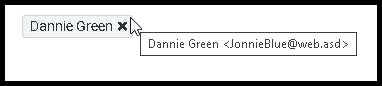
To be sure, hover over the recipient's name with a mouse to review the address before sending.
Most email header fields can be manipulated by attackers. As you can see for yourself, most email fields can be controlled or manipulated. With a carefully configured Mail Transfer Agent (MTA), an attacker can craft an email with an arbitrary look and metadata, including who the message is from, which program was used to construct the message, even the originating IP address (with some exceptions).
The message properties not controlled by attackers are the attributes (email header fields) added to the message by the second and subsequent email servers along the email's route. Among such (more trustable) fields are the metadata appended by the recipient's own email server and anti-spam filters, e.g. the spam score. Ironically, a typical message originated by an email scammer does contain attributes revealing some true information about the sender or the email system used but does so by omission or a lack of an attacker's sophistication.
The volume of forensic details captured within an email header depends on the recipient's email service provider. The same message sent to recipients hosted by different service providers (e.g. Yahoo, Gmail, and iCloud Mail) will have a different set of header fields and metadata appended to its header depending on the destination. This is caused by each receiving email server having a separate set of rules and processing logic, adding to the same original message a varying amount of additional information provider to provider.
The same message may be classified as Spam or Spoof by one service, and a regular Inbox-delivered email by another. Therefore, for a complete analysis of a problematic message with multiple recipients (and recipients' email providers), all copies of the message should be retrieved. The messages should NOT be deduplicated in the above scenario as most email deduplication programs do not take into account the differences in header metadata.
Your email is a critical part of your digital identity, yet it is based on a plain-text SMTP protocol. Your email is used to identify your bank accounts, receive important communications, submit taxes, perform password resets, accept delivery of potentially sensitive documents. Yet the Simple Mail Transport Protocol (SMTP) used for email was designed with virtually no security in mind, for plain-text-based transmission and storage of information, easily spoofed and altered.
While today SMTP is typically combined with Transport Layer Security (TLS) to protect email messages while in transit, many email providers (like Gmail) do not encrypt data at rest, i.e. while your emails are stored at a datacenter. Microsoft 365 paid subscription accounts and Apple iCloud Mail free accounts do encrypt data in storage; however, at all times, they maintain security keys to access your email.
As Apple puts it succinctly, "iCloud Mail does not use end-to-end encryption because of the need to interoperate with the global email system". Apple goes on to inform you that the decryption keys are maintained by Apple in its own data centers, "so we can help you with data recovery".
End-to-end encryption for email implies that your messages are protected in transit and at rest such that the email provider itself cannot access message contents. For the vast majority of email providers, end-to-end encryption is simply not an option.
What this effectively translates into is that the administrative personnel at Google, Apple, Microsoft, Yahoo, and other email providers have a technical ability to access your mailbox, whether it is encrypted at rest or not. So do the automated content scanning programs used by email providers to look for unlawful content or to deliver "personalized content and experience", potentially targeting you for ads, or selling the information about you to marketers or other organizations.
Unfortunately, when data center personnel turns rogue, they may abuse their access rights, to include the data in your mailbox. So can the threat actors who successfully exploit a data center where your email is kept. Will you continue to store many years worth of private communications, transaction confirmations, tax documents, and personal photos in your mailbox at a data center, whose location you do not know?
To summarize, despite being used for critical aspects of your digital identity, your email is not always secured in transit and most likely stored as plain text at rest. Your mailbox is subject to automated scanning for keywords and file fingerprints while stored at a datacenter and could be used or abused by your email provider, its personnel, or by attackers who manage to breach a data center maintained by your email provider.
Do you like your free email service? The reality is that whether you pay for it or it's free, very few services can provide adequate data protection or end-to-end encryption. Your free email provider is interested in having you as a mailbox user and having your data at its disposal. So much so that your free email provider is willing to pay for the electricity to power up its data center where your mail is located, pay for backups, system upgrades, software and personnel, and for the physical cooling of the servers, only so that they can provide the email service to you "for free".
How can you maintain ownership and control of your data? Perhaps by keeping most of your data with you, on your devices, in your local (home) backups. At the very least, offload historical data older than a year from your free mailbox and make multiple backups on the devices that you can secure and control. Explore direct peer-to-peer secure messaging options, which bypass content storage at third-party data centers altogether.
Each one does a single job properly, in the same plain language, with no account anywhere.
Send a file from the browser, encrypted before it is uploaded, or use the Windows application for larger files and whole folders.
Visit filesender.io →Send a private message as a link that can be opened once and then disappears. No account and no phone number.
Visit textme.im →A one-time encrypted conversation that opens from a link. No account, no phone number and no history kept.
Visit protected.chat →Reach your own PC from anywhere over a direct, encrypted channel between the two machines, using credentials of your own choosing, with no provider or service in the middle.
Visit mypc.direct →Hand a whole gallery of photos and videos to family directly from your computer, using one-time codes that expire on their own and can be revoked at any moment.
Visit sending.pics →Reads the drive’s own file table instead of walking folders, so the whole disk appears quickly, sorted by size. Delete, move and rename from the same window, with a running total of the space reclaimed.
Visit claimdisk.com →Shows the devices on your network in about thirty seconds, explains in plain English what is wrong, and fixes it in one click — with a link straight to your own router’s security advisories and firmware.
Visit lanfixer.com →Draws the connections your PC makes on a map of the world, shows which program made it, and blocks any address, region or whole country that has no business being there.
Visit mapblocker.com →Free for personal use, all of them. Business, government and non-profit use of the Windows applications begins with a free two-week trial.
